


Phone Storage Clean
4.5669.00 Reviews
App Specs
- Version
- 1.1.1
- Updated On
- License
- Free
- Downloads
- 1,000,000+
- Developer
- Ureno Tree Service Inc
- Categories
- Productivity
- Platform
- Android
Screenshots
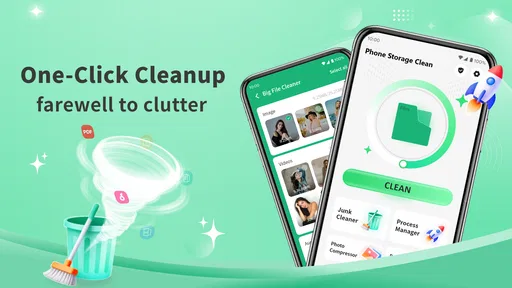
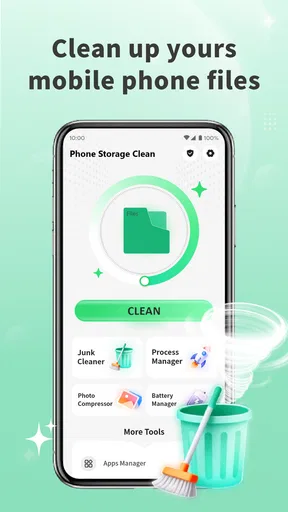
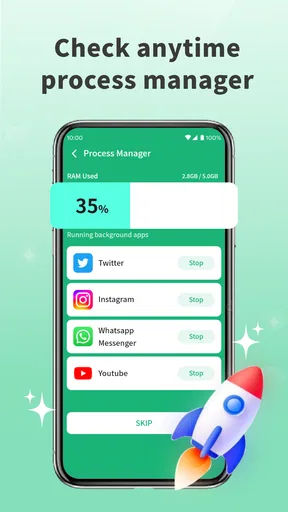

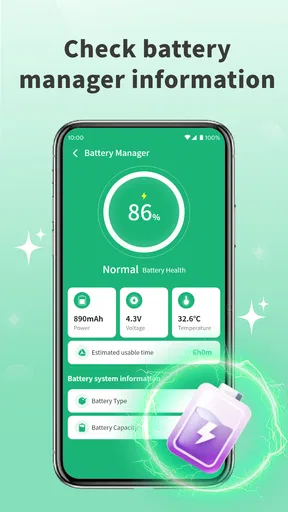
 Analysis by AppCompare
When storage gets tight, the hard part is rarely finding a delete button; it’s deciding what can go without causing regret later. Phone Storage Clean is aimed at that everyday problem, with tools for reviewing files and apps rather than treating every item as disposable. I’d approach it as a helper for making a more informed cleanup, not as a reason to delete everything it flags.
A new utility with a modest track record
The current release is version 1.1.0, and the app arrived on Dec 26, 2025. That makes it a relatively new option, so I’d judge it by the usefulness of its current tools rather than assume it has a long history of updates. The rating sits at 4.6 from around 4.5K ratings, with 498 written reviews, and it has passed 500K installs. Those figures suggest that many people have tried it, but they can’t tell you whether its recommendations fit your particular phone or habits.
It is a free productivity app from Ureno Tree Service Inc, with an Everyone age rating and Android support from version 6.0. For someone who wants to inspect storage without paying upfront, that is an easy starting point. The key question is whether the suggested cleanup is clear enough for you to trust your own decisions; I would still review the selection before removing anything, especially personal photos or documents.
What a cleanup session should look like
I’d use the scan as a way to create a shortlist, not as a one-tap solution. Start with the largest items, then check whether each one is a file you recognize, a duplicate you truly do not need, or an app you have stopped using. A large file may be a video you meant to keep, and two similar-looking pictures may not actually be interchangeable. The time spent checking is a useful trade-off for avoiding an accidental loss.
For a realistic example, imagine you are about to record a family event and your phone warns that space is running low. A quick review of large files and old downloads could help you decide what can be moved or removed before you leave. I would not clear a whole photo collection in a rush, though. If the app presents duplicates, compare the previews and keep the version with the quality or edits you want; “duplicate” is only useful if the match is genuinely redundant.
Where it fits among storage tools
Phone Storage Clean sits in a crowded kind of utility: most phones already offer built-in storage screens, while file managers give more direct control over folders. The built-in option is often the better first stop if you only want a basic view of what is taking up space or need familiar system controls. A file manager may suit you better if you regularly sort folders yourself and want to choose every item manually. This app makes more sense when you value a guided review of large files, duplicates, and apps in one place.
That convenience has a limit. Any cleanup suggestion depends on your judgement, and an automated label cannot know whether a file matters to you. I would also avoid expecting a storage cleaner to fix every reason a phone feels slow: freeing space may help when storage is genuinely crowded, but it is not a substitute for checking other causes of performance problems. If your device has plenty of room and you are comfortable using its built-in tools, installing another utility may add little.
Worth Reading Before You Choose

EA SPORTS FC Mobile 26 Is a Bigger Football Game, but It Takes Time

Flipboard Shows What News Apps Must Do Beyond the Feed

Switching to Android Auto Means Rethinking Your Driving Routine

Google Calendar Makes a Crowded Week Easier to Manage

Ludo King Makes the Most of the Minutes Between Plans

Baby Panda World Brings Quick Play to Modern Phones, but Its Game Library Feels Busy
Getting to Know Phone Storage Clean
First things first, Phone Storage Clean is all about helping you manage your device storage without the usual headache. It’s available on both Android and iOS, which is a huge plus for those of us switching between platforms. The app aims to free up space by identifying large files, duplicates, and those sneaky apps you forgot you downloaded.
User Interface and Experience
When you first open the app, you’re greeted by a clean, intuitive interface. It’s like a breath of fresh air compared to some of the cluttered storage apps I’ve seen. The main screen gives you a clear overview of your storage situation, breaking down what’s taking up space in an easy-to-understand format. You know, because who really needs a complicated chart when all you want to do is clear some space?
The navigation is smooth, and I found that all the features are just a tap away. Whether you’re a tech whiz or someone who struggles with technology, Phone Storage Clean keeps things simple and straightforward.
Features That Stand Out
Now, onto the features. This app isn’t just about deleting files willy-nilly. It’s got a few tricks up its sleeve:
- Smart Cleaning: The app uses a smart algorithm to suggest files you can safely delete. You won’t have to worry about accidentally erasing something important.
- Duplicate Finder: Ever wonder why you have five copies of the same photo? This feature identifies duplicates, so you can keep just one and say goodbye to the rest.
- App Management: It shows you which apps are hogging space and when you last used them, helping you decide what to keep and what to ditch.
These features work together to ensure you have the most efficient cleanup possible, without the risk of losing precious data.
Performance and Reliability
I’ve been using the app for a few days now, and it’s been running smoothly. It doesn’t drain your battery or slow down your phone, which is a major win in my book. I’ve tried other storage apps that made my phone feel like it was dragging through mud, but not this one.
The scans are quick, and the app gives you control over what to delete. It’s like having a personal assistant for your phone, and who doesn’t want that?
Is It Worth It?
So, is Phone Storage Clean worth downloading? In my opinion, absolutely. It’s a lifesaver for anyone who’s constantly battling with storage issues. The app is easy to use, effective, and doesn’t come with any hidden catches. Plus, it’s available for free, with optional in-app purchases if you want to unlock additional features.
If you’re tired of seeing that "storage full" notification, give it a try. It’s a hassle-free way to keep your device running smoothly, and you might even find a few forgotten gems in the cleanup process.
So, go ahead, make some space for new memories and apps. Your phone—and your sanity—will thank you for it!
Small habits that make the review safer
I would make cleanup a short, deliberate routine rather than wait until the phone is nearly full. When you have time to inspect suggestions, it is easier to recognize an old download you no longer need and harder to confuse a meaningful file with clutter. After deleting anything important, check the relevant album or folder before moving on. That simple pause matters more than how fast a scan finishes.
For photos, I’d treat duplicate detection as a prompt to compare, not permission to bulk-delete. Edited versions, compressed copies, and images saved from messaging can look alike while serving different purposes. For apps, the last-used date can help identify forgotten installs, but seasonal or travel apps may sit unused for months and still be worth keeping. A clean storage list is not automatically a better phone if it removes something you rely on occasionally.
Who will get the most from it
This is a sensible fit for people who take lots of photos, download files for one-time tasks, or find system storage menus hard to interpret. It can also help less confident users begin with a guided list instead of browsing folders without knowing what is safe to touch. If you manage a family member’s phone, the app’s straightforward presentation may make it easier to review space together, provided the owner makes the final call on personal content.
I’d skip it if you already maintain your storage comfortably with the phone’s own settings, or if you want a full-featured file manager for moving, renaming, and organizing folders. It is also not the right tool for someone who expects a cleaner to decide what matters without supervision. The useful middle ground is clear: let the app surface candidates, then use your own context to approve or reject them.
Questions worth checking before you clean
Will removing a file erase it permanently? Treat any deletion as consequential and check the app’s confirmation steps and your phone’s available recovery options before proceeding; do not assume every item can be restored. Does finding duplicates mean the remaining copy is backed up? No—duplicate identification and backup are different jobs, so keep a separate backup routine for anything you cannot replace.
Will it reclaim space from every app? The app can help you review app storage and decide what to remove, but the space recovered depends on what is actually on your device and what you choose to delete. If a messaging app or streaming service is consuming room, review its own downloads and settings too; a general cleanup screen may not replace those app-specific controls. And if the scan finds little worth removing, that is still a useful result: it tells you to look elsewhere rather than keep deleting blindly.
What I would watch in future use
Because this is an early version, the practical test is whether future releases keep the cleanup suggestions understandable and make review feel safe, not merely faster. I would look for clear explanations of why an item is being recommended, dependable controls over selections, and a smooth experience as the app matures. Those are expectations, not promises about what comes next. For now, I see the strongest case for it as a free, approachable way to inspect clutter and make careful choices—provided you stay in control of what leaves your phone.
Pros
- User-friendly interface simplifies cleaning.
- Quick scan identifies junk files instantly.
- Customizable cleaning options available.
- Boosts phone performance significantly.
- Supports multiple languages for accessibility.
Cons
- May occasionally misidentify important files.
- Ads can be intrusive during cleaning.
- Some features require in-app purchases.
- Limited support for older devices.
- Requires frequent updates for optimal use.
FAQs for Phone Storage Clean
What is Phone Storage Clean and how does it work?
Phone Storage Clean is an app designed to optimize and free up space on your smartphone. It works by scanning your device for unnecessary files, such as cache, temporary files, and duplicates. Once identified, it offers the option to delete these files, thus improving your phone’s performance and storage capacity.
Is Phone Storage Clean safe to use on my device?
Yes, Phone Storage Clean is safe to use. The app only deletes files that are unnecessary or redundant, ensuring that important data is not affected. It also provides a preview of files before deletion, allowing users to make informed decisions about what to remove.
Does Phone Storage Clean require any special permissions?
To function effectively, Phone Storage Clean requires access to your device’s storage and files. This permission allows it to scan and identify files that can be safely removed. Rest assured, the app does not access personal information or sensitive data without explicit consent.
How often should I use Phone Storage Clean to maintain optimal performance?
The frequency of use depends on your phone’s storage habits. For regular users, running the app once a week should suffice to maintain optimal performance. However, if you frequently download apps or media, you might benefit from more frequent clean-ups, such as twice a week.
Will using Phone Storage Clean affect my phone’s battery life?
Using Phone Storage Clean should not have a significant impact on your phone’s battery life. The app is designed to run efficiently and only activates when you choose to perform a clean-up. It does not run continuously in the background, ensuring minimal battery consumption.


